
How to Navigate the Customer Portal
The urfuture Customer Portal is ur central hub for managing your account, accessing support, and keeping track of ur enquiries. Whether you're looking to raise a support ticket, contact ur Customer Success Manager, or access helpful resources, everything can be found in one place.
Home Dashboard
When you first log in, you'll land on the dashboard. This provides an overview of ur account and quick access to the most commonly used areas of the portal.
From here, you can easily navigate to:
- Support Tickets
- Knowledge Base
- Customer Success contact details
Submitting a Support Ticket
If you need technical assistance or have a product question, select Create a Support Ticket from the footer or the navigation menu in the top right-hand-side.
When creating a ticket, include:
- A clear description of the issue
- Any relevant screenshots
- The job or candidate (if applicable)
- The steps you've already taken
Once submitted, you'll receive confirmation and can track the progress of ur request directly within the portal.
Viewing Existing Tickets
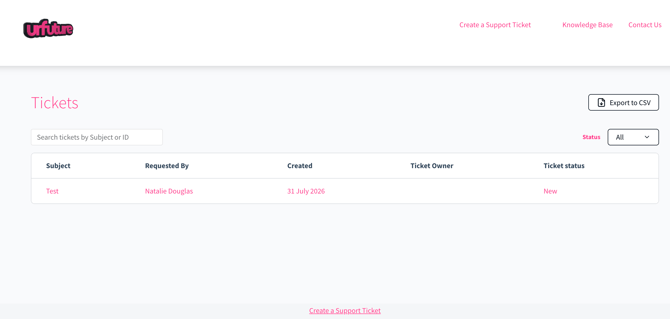
The Tickets section displays all of ur previous and active support requests.
Here you can:
- View ticket status
- Respond to support updates
- Upload additional information
- See when ur issue has been resolved
Contacting Your Customer Success Manager
ur Customer Success Manager (CSM) is ur dedicated point of contact for onboarding, training, platform optimisation, and account support.
You can find their details in the Contact Us section, you can also submit a call back request by progressing through the form.
Update ur Contact Details
You can submit a form to update ur contact email & phone number, or submit the contacts of other relevant employees from the top left navigation menu.
Knowledge Base
The Knowledge Base contains guides, FAQs, best practice articles, and product info to help you get the most out of urfuture.
You can browse by category or use the search bar to quickly find answers to common questions.
Need More Help?
If you can't find what you're looking for in the Knowledge Base, simply submit a support ticket or contact ur Customer Success Manager, who will be happy to assist.