I haven’t received the email to sign in. What do I do?
If you have been set up as a user and have not received the sign up email. Please enter your email when logging in to the platform and select the 'forgot password' flow. This will trigger another email for you to set up a password. From this, you will be able to log in with a new password. If this still doesn't work, contact your CSM and we will connect you to our developer.
How can I send a candidate profile to an employer?
When you are on a candidate profile, you will see a pink button labelled 'Profile Link'

Select this and it will copy a link to your clipboard. You can then send this to an employer and to access they will need a password. The password is your Provider Trading Name as it appears on your profile.
What authentication app do I need?
We recommend using the google authentication app. When on the app there is a '+' on the bottom right, select this and then select 'scan QR code'. You will then scan the QR code presented when you first sign up to urfuture. The app will then generate you a code which you will need every time you log in. This code expires every 30 seconds and will regenerate a new code.
How does the auto reject work?
You can select auto reject on the 'job workflow' page when posting a job.
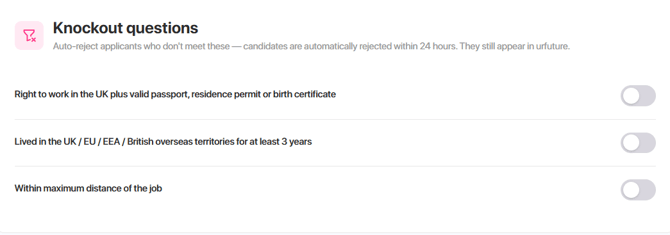
This allows the candidates to apply, however a day after the application is made, they will receive a rejection email. This gives you 24 hours to look through the candidates and have any conversations in case of relocation etc.
How can I see what the job looks like to candidates?
In 'manage posts' go to the 3 dots next to the job title. Then select 'View Post', this will then pull up a view of what the role will look like to the candidate. This way you can test different job swipe images etc.
Can I edit working traits once the job has been posted?
No, you cannot change the working traits once a job has been posted as it has already calculated the matches for the role. If you want to change working traits, we suggest re posting the job with different working traits to see if this performs better and brings you mroe relevant candidates.
Can I auto accept?
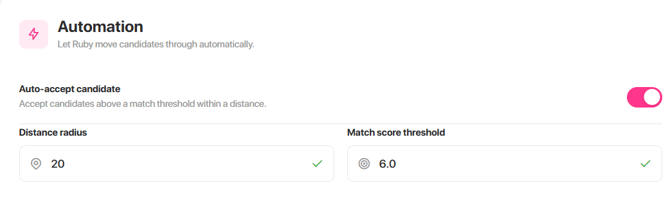
Yes! When posting a job, go to the 'Job Workflow' page, and at the bottom you will see 'Automation Settings'. You can input a distance radius and a match score threshold. If you select this, all candidates within this criteria will be automatically accepted.
How do I add employer profiles?
To add an employer profile, go to 'Company Settings', then go to 'Additional Brands'. Here you can add an employer profile with their logo, job swipe images, a company bio and more. Then when you post a job, select an employer, that employers logo will appear on job level and it will pull through their job swipe images for you so you don't have to search for an image every time you post a job!
Do jobs close once the closing date has passed?
No, jobs will pause when they have past their closing date, this allows you to still screen candidates before they receive any automated messaging letting them know the role has closed. To close a role you need to go to 'manage posts' then the three dots next to the job title and 'close job'
What socials are included?
This depends on your subscription. But everyone that works with us will receive 2x Carousel announcement post on Instagram - urfutureapp/HTGAJ, x2 Stories on Instagram - urfutureapp/HTGAJ. Please contact your CSM to discuss social packages.
How can I improve my applications?
If you aren't getting relevant applications, we would suggest taking a look at the working traits selected. Try and post the same role with different working traits to see if that improves the quality of applications. If you have any concerns on applications, please contact your CSM and we can set up a call to discuss new strategies. You can also invite candidates to apply to ur role that you believe are a good match from ur Talent Pool or urrecruiter.
How do I reset my password?
When you go to the sign in page. You need to select 'forgot password', this will then trigger an email to you so you can enter a new password!
How do notifications work?
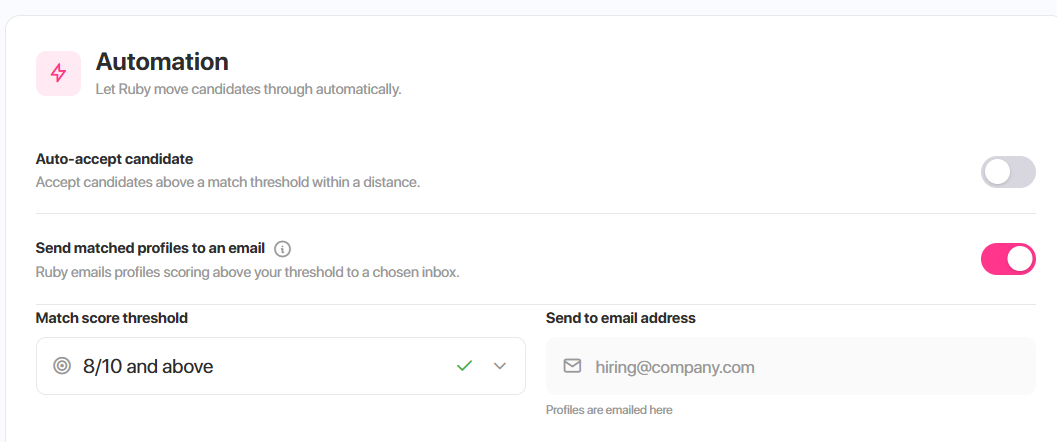
When you are creating a job, go to the 'Job Workflow' page, under the 'Automation', you will see 'Send matched profiles to an email', if you select this, the job owner (who posted the job) will receive an email when a candidate has applied which will give a short snapshot of the candidate, including distance from role, job title and job match score.
How are rejected candidates managed?
You can select 'Rejected Application' in the job workflow page when posting a job to send out messaging to all candidates that are rejected. If rejected they will also go into your talent pool so you can contact them if a role becomes available that's better suited to the candidate.
Can multiple recruiters access our account?
Yes! To add a user to your account, go to 'Company Settings', then 'Company Users', here you can add a recruiters email and they will receive an email to gain access to the platform. You can manage users here also.
For more information on this, please Click Here - https://urfuturesupport.io/adding-a-user-to-access-the-platform