Overview
The Candidate Profile gives employers a complete view of each candidate beyond their CV. Rather than relying solely on qualifications and work history, urfuture combines behavioural science, AI, and candidate-provided information to help employers make more informed hiring decisions.
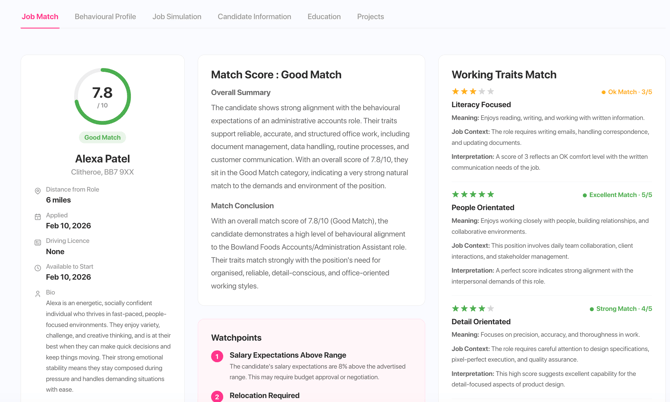
Within the profile, you can review a candidate's experience, education, working preferences, behavioural traits, Career Match, Job Match, and communicate directly through the platform.
Why the Candidate Profile Matters
Unlike traditional job boards, urfuture provides significantly more context about every applicant, allowing employers to:
- Understand the person behind the CV
- Identify candidates with the strongest long-term fit
- Reduce unconscious bias
- Compare candidates consistently
- Contact candidates directly from one place
- Make faster, data-driven hiring decisions
How can I send a candidate profile to an employer?
When you are on a candidate profile, you will see a pink button labelled 'Profile Link'

Select this and it will copy a link to your clipboard. You can then send this to an employer and to access they will need a password. The password is your Provider Trading Name as it appears on your profile.
How do notifications work?
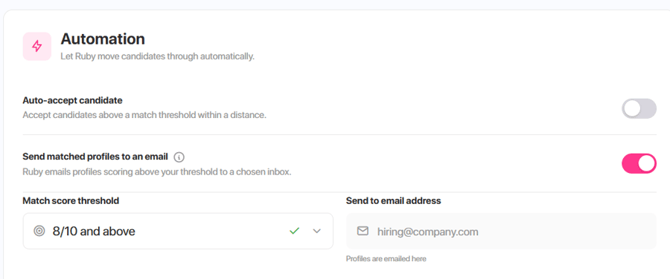
When you are creating a job, go to the 'Job Workflow' page, under the 'Automation', you will see 'Send matched profiles to an email', if you select this, the job owner (who posted the job) will receive an email when a candidate has applied which will give a short snapshot of the candidate, including distance from role, job title and job match score.